
The right video. The right user. The right moment.
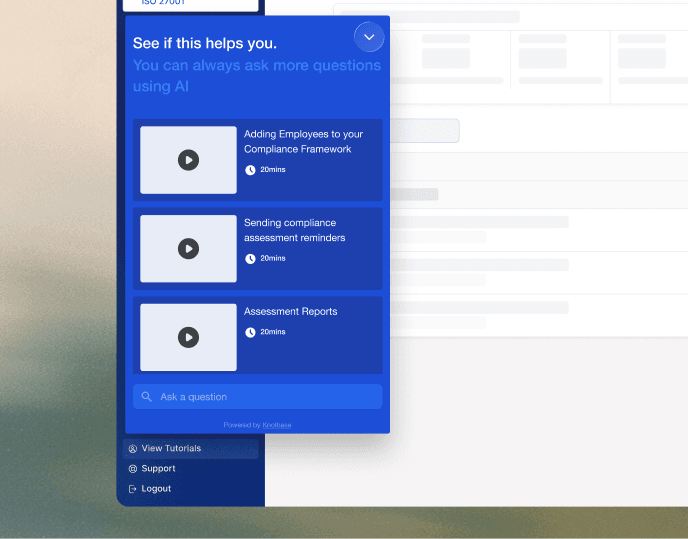
An in-app widget that surfaces relevant Knolbase videos to every user, based on who they are and what they are doing. Native to your app. Zero content rework per release.
Video engagement
To install
Content rework per release
One widget, every stage of the customer journey.
The same widget that welcomes a new user introduces them to new features, answers their questions, and shows them power-user content as they grow.
Onboarding
A new user lands. The widget surfaces the welcome and setup videos that match their role, so they see what is relevant to them.
Feature adoption
You ship a new feature. The widget surfaces the explainer video to users who would benefit, instead of an email blast they will not open.
Self-serve answers
When a user has a question, the widget surfaces the video that answers it. The right clip, not a list of articles to scan.
Power-user features
As users grow into your product, the widget surfaces the advanced videos that help them get to the next level.
A video surface your team controls.
Native, on brand.
The widget renders inside your app in your styling, under your domain. It looks like a native part of your product, not a bolted-on iframe.
Audience-aware.
The videos surfaced change based on who the user is. A new trial signup, a paying admin, or a returning power user each sees a different shelf of content.
Always current.
Your library lives in Knolbase. When you update a video or upload a new one, the widget reflects it immediately. No content rework when your product moves.
One developer. One afternoon. Done.
Drop in the script
Your engineer adds the Knolbase script tag, passes the user variables you already have, and ships. That is the entire install.
Configure in Knolbase Admin
Your product or CS team takes over. Choose which videos surface for which audiences, in which parts of the app, and how the widget shows up.
Go live, then iterate
The widget appears inside your product. New audiences, refreshed video shelves, brand-new placements, all ship from the portal in seconds.
Measure and tune
Every view, watch-through, and search reports back. Find the videos that drive activation, double down on what works, replace what does not.
Frequently asked questions
Add a script tag and pass the user variables you already have (id, role, plan). That is the entire engineering surface. Everything else is configured from Knolbase Admin by your product and CS team.
It surfaces the right Knolbase video for what the user is doing inside your app. The user opens the widget when they want help, picks from a personalized shelf of videos curated for their role and current screen, and watches what they need. Nothing pops over your UI.
Yes. Set your colors, typography, voice, and the way it shows up. The widget runs under your domain and looks like a native part of your product.
Yes. From Knolbase Admin, map videos to audiences, routes, and triggers. Different users land on different shelves of content automatically.
No. The widget surfaces videos based on signals you send it (route, user attributes, events). It does not depend on your DOM, so a UI change does not break it.
Yes. The widget runs in privacy mode where required, your data stays yours, and Knolbase never trains foundation models on customer content. Full audit logs are available in Knolbase Admin.
Pair this with the rest of Knolbase.
The right video, in the right moment, inside your product.
Book a demo. We will set the widget up against a real product and show you the videos surfacing live.